AI Product Photos for Shopify: Complete Guide
Transform amateur phone shots into professional Shopify product photos with AI. Learn how to create consistent, stunning product images without expensive equ...
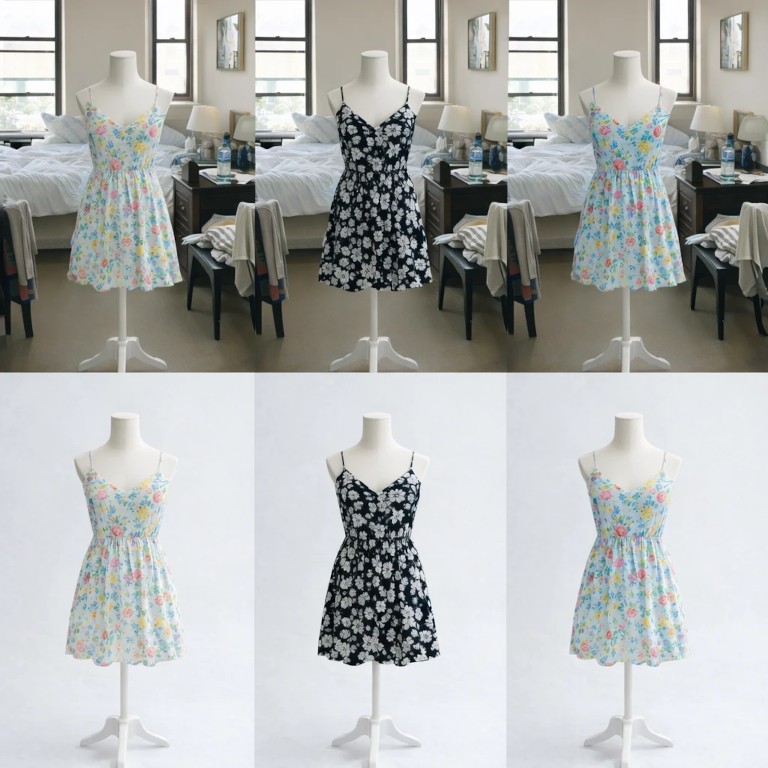
You launched your Shopify store. You’ve got products ready to sell. But there’s one problem: your product photos look like you shot them in a messy bedroom with a dying phone battery. (I’ve been there.)
Here’s the uncomfortable truth: professional product photography sells. Customers judge your entire brand by your photos. Amateur photos = amateur brand = lost sales. But professional photography? That’s a $500+ minimum investment per shoot, with props, lighting, and editing time you don’t have.
What if you could snap photos with your phone in literally any setting, then transform them into professional, consistent product images in seconds? That’s exactly what ImageFix does.
In this guide, I’ll show you how to use AI-powered product photography to create stunning, consistent Shopify product photos without hiring a photographer or buying studio equipment.
Why Professional Product Photography Matters for Shopify
Let’s be real: Shopify customers have options. Lots of them. When they’re scrolling through search results or comparing stores, your product photos have maybe 0.3 seconds to grab their attention.
Professional product photography:
- Builds trust instantly - Your brand looks established and reliable
- Increases conversion rates - Customers can actually see what they’re buying
- Reduces returns - Accurate, clear images set proper expectations
- Creates consistent branding - All your products look like they belong together
But here’s the kicker: you don’t need professional equipment to get professional results anymore. AI-powered editing makes it possible to transform any amateur photo into a stunning product shot.
Meet the Solution: AI Product Photography with ImageFix
ImageFix is an AI-powered photo editing tool that works entirely in your browser. No software download. No Photoshop skills. No studio required. Just upload your photos, describe what you want, and let AI handle the rest.
Here’s what makes it perfect for Shopify sellers:
- Single Image Reference - Apply one professional setup to ALL your products (we’ll dive deep into this)
- Batch processing - Edit dozens of photos at once
- Natural language prompts - Just describe what you want
- AI background replacement - Transform any surface into professional staging
- Pay-as-you-go credits - No subscriptions, no commitments
The game-changer for Shopify stores? Single Image Reference. This tool lets you create ONE perfect studio setup and apply it to EVERY product, giving you consistent, professional catalog photos across your entire store.
Creating Consistent Product Photos: A Step-by-Step Tutorial
Let me walk you through exactly how to transform amateur phone shots into professional product photos using ImageFix’s Single Image Reference tool.
The Setup: Amateur Photos, Professional Results
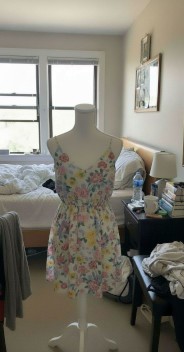
For this tutorial, I’m working with three floral dress photos. Here’s the situation:
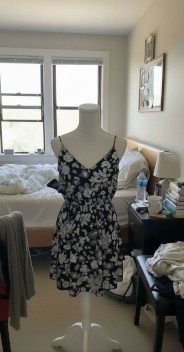
- Before: Three amateur cell phone shots taken in a messy bedroom (portrait ratio, poor lighting, clutter visible)
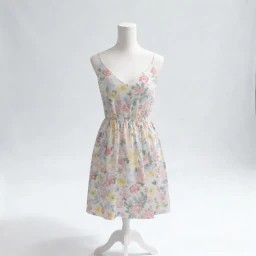
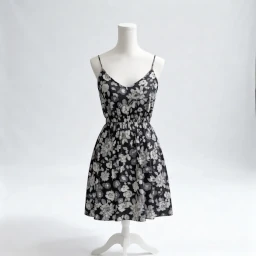
- After: Professional 1:1 square shots with perfect studio lighting, consistent grey backdrop, and polished presentation
The secret weapon: I created a “Studio Props” reference image - a professionally lit shot of a bare mannequin against a grey studio backdrop. This is the reusable prop I’ll use to transform all three dresses.
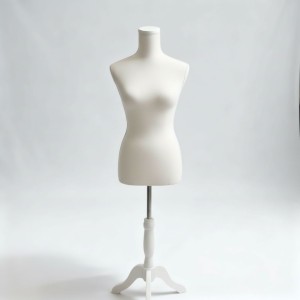
Want to learn how to create your own studio backdrops like this? Check out my guide on AI product photo backdrops.
Step 1: Upload Your Product Photos
Log into ImageFix and upload your photos by dropping them into the upload area or importing from Google Drive. Here’s the pro tip: name your image set something meaningful. Since I’m uploading three summer dresses, I’ll call this set “Summer Dress Collection.”
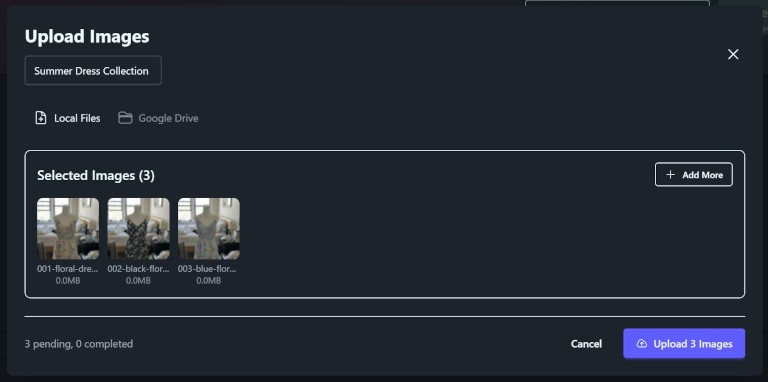
Quick tip: Your photos don’t need to be perfect at this stage. I literally shot these in a messy bedroom with bad lighting. The AI will handle the heavy lifting.
Step 2: Choose Single Image Reference
After uploading, click “Proceed to Editor.” You’ll land in the editor interface. From the tools panel on the left, select “Single Image Reference.”
This tool is designed specifically for creating consistent product photos. It lets you:
- Reference ONE perfect setup from any image set
- Apply that setup across MULTIPLE product photos
- Maintain exact lighting, backdrop, and positioning across everything
Perfect for Shopify stores that need consistent product catalogs.
Step 3: Select Your Target Images
Click “Select all” to grab all your uploaded images. (You can also select specific photos if you only want to edit some of them.)
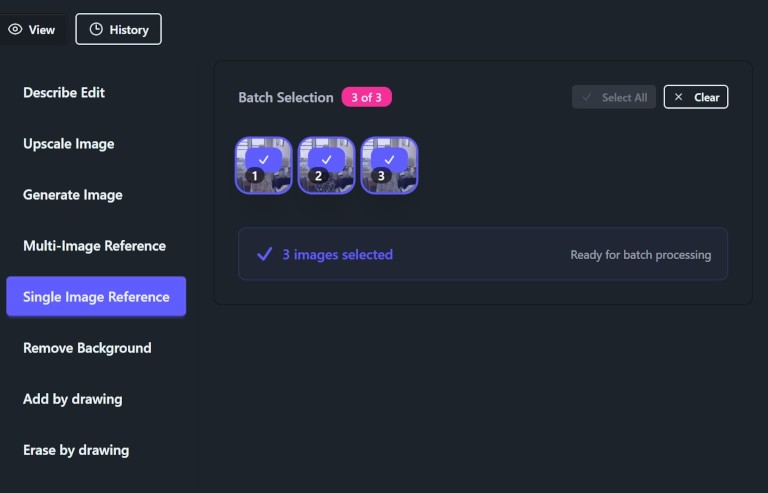
Step 4: Choose Your Reference Image
By default, ImageFix shows images from your current set. But here’s where the magic happens: we’re going to use a reference from a completely different set.
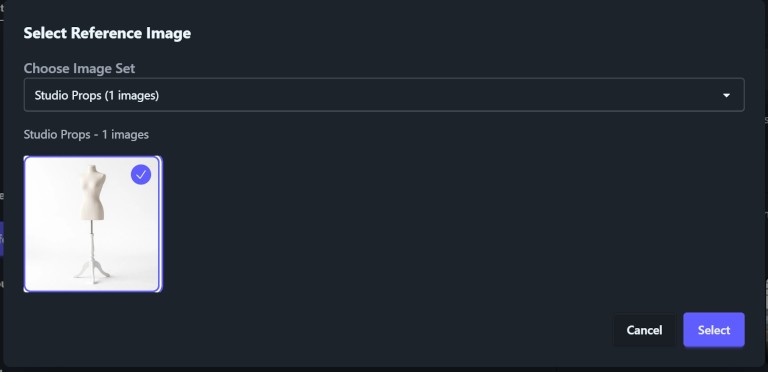
Click “Choose from different set” and select the “Studio Props” set I mentioned earlier. This contains that perfect shot of the bare mannequin with professional studio lighting.
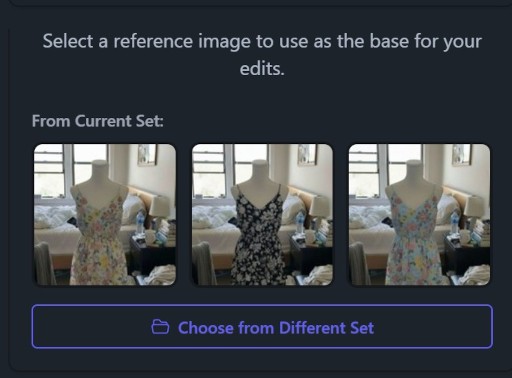
Select the bare mannequin image and click “Select.” This is now your reference “prop” - the AI will apply all your product photos to this exact setup.
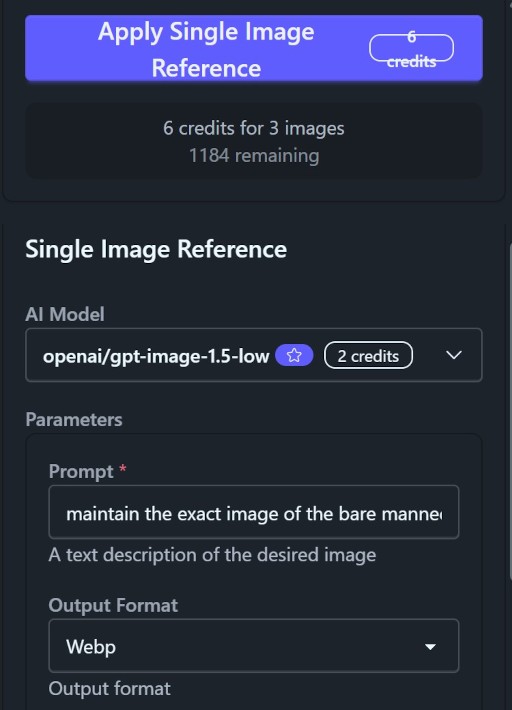
Step 5: Select Your AI Model and Write Your Prompt
Choose your AI model. I’m using openai/gpt-image-1.5-low - it’s perfect for this job at only 2 credits per photo (so just 6 credits total for three dresses).
Now for the prompt. Be specific about what you want:
Maintain the exact image of the bare mannequin with the professional photography backdrop. Apply the exact same floral dress to the mannequin.The key elements:
- “Maintain the exact image” - Tells the AI to keep the reference setup exactly as-is
- “Professional photography backdrop” - Reinforces the quality we want
- “Apply the exact same floral dress” - Tells the AI to apply each dress to the mannequin
Step 6: Click Apply and Watch the Magic
Hit “Apply” and ImageFix processes all three images in batch. No editing each photo individually. No manual adjustments. Just wait for the AI to work its magic.
When it’s done, you’ll see:
- Perfect 1:1 square images (ideal for Shopify)
- Consistent grey studio backdrop
- Professional lighting
- Polished, catalog-ready product photos
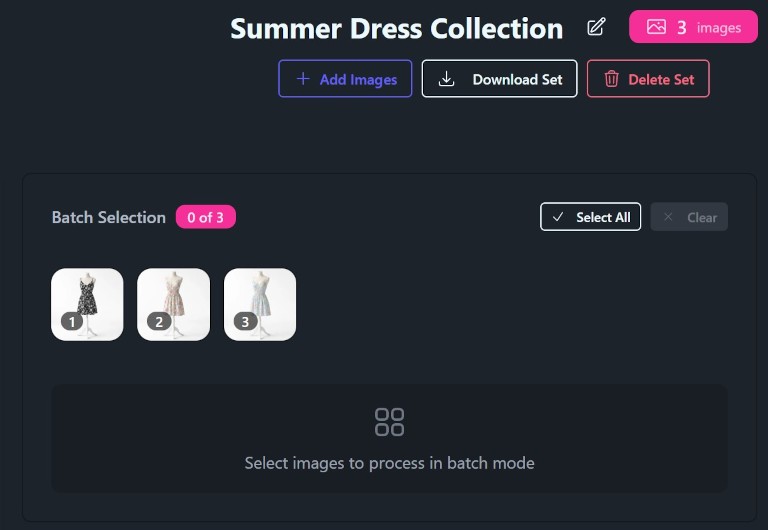
Download the set or export directly to Google Drive. You’re ready to upload to Shopify.
The Transformation: Before vs. After
Here’s what we achieved:
Before: Amateur cell phone shots, messy bedroom background, inconsistent lighting, portrait orientation
After: Professional catalog shots, clean studio backdrop, perfect lighting, square Shopify-ready format
Floral Dress
Before
After
Black Floral Dress
Before
After
Blue Floral Dress
Before
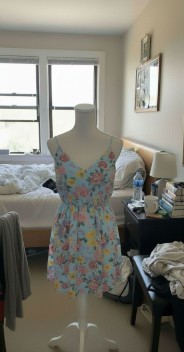
After
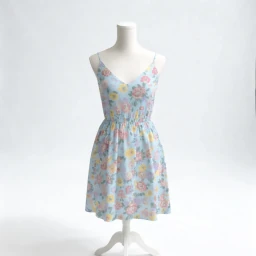
All three dresses now look like they were shot by a professional photographer in a dedicated studio. Consistent branding. Professional presentation. And it took about 5 minutes.
Why This Strategy Works for Shopify Stores
Here’s the brilliance of this approach for e-commerce:
Create Once, Use Forever
That “Studio Props” reference image? You create it ONCE. Then use it for EVERY product photo you ever take. Consistent backdrop, consistent lighting, consistent positioning - across your entire catalog.
Batch Processing Saves Hours
Instead of editing photos one by one, you process them in batches. Upload 20 products, select them all, apply your reference, and get 20 professional images in one shot.
No Equipment Overhead
No need to build a studio, buy lighting, or rent props. Just snap photos with your phone wherever you are. The AI handles the rest.
Scalable as You Grow
Launching a new product line? Same process. Expanding from 10 products to 100? Same process. Your reference setup scales infinitely.
Professional Results on Any Budget
Professional photography typically costs $500+ per shoot. ImageFix lets you achieve professional results for pennies per photo - no subscription required.
Advanced Tips for Shopify Product Photography
Once you’ve mastered the basics, here’s how to level up:
Create Multiple Reference Setups
Different product types might need different setups. I’ve seen sellers create:
- Studio Props - Neutral backdrop for clean, minimal product shots
- Lifestyle Props - Warm lighting and organic backgrounds for lifestyle feel
- Seasonal Props - Holiday-themed setups that you reuse every year
Match Your Brand Aesthetic
Your reference setup should reflect your brand. Minimalist brand? Go for clean white or light grey backdrops. Eco-friendly brand? Use natural wood or stone textures. Premium luxury? Darker tones with dramatic lighting.
Improve for Shopify’s Requirements
Shopify works best with:
- 1:1 square images (2000x2000px recommended)
- High contrast - Make products pop against backdrops
- Multiple angles - Show front, back, and detail shots
- Consistent sizing - All your product images should be the same dimensions
Use Background Removal for Marketplace Expansion
If you’re also selling on Etsy, eBay, or Amazon (which often require white backgrounds), ImageFix’s AI background removal tool can generate clean white backgrounds from the same source photos. One set of amateur shots = multiple marketplace-ready formats.
Common Questions (I Get Asked These All the Time)
Do I need professional photography skills? No. That’s the whole point. If you can point a phone camera and type a sentence, you can do this.
What kind of photos work best? Actually, it’s pretty forgiving. Good lighting helps (shoot near a window), but I’ve gotten great results from photos taken in less-than-ideal conditions. The AI is surprisingly capable.
Can I use this for non-clothing products? Absolutely. Jewelry, home decor, electronics, food - whatever you’re selling, the same principles apply. Create a reference setup that shows your products in the best light.
How much does it cost? ImageFix uses a pay-as-you-go credit system. The model I used in this tutorial costs 2 credits per photo. New users get 50 free credits to start - no credit card required.
Can I edit photos further after processing? Yes. If the AI didn’t get something quite right (a shadow in the wrong place, an accessory that needs removing), use ImageFix’s Smart Pen tools for precision touch-ups.
Ready to Transform Your Shopify Photos?
Here’s the bottom line: Professional product photography isn’t optional for serious Shopify stores. But paying for it isn’t your only option anymore.
With ImageFix, you can:
- Create professional product photos in minutes, not hours
- Maintain consistency across your entire catalog
- Scale your visual quality as your store grows
- Skip the expensive studio setup and photographer fees
The best part? You can try it completely free. No credit card required. Just upload a few photos and see the transformation yourself.
I wish I’d had this tool when I was starting out. It would have saved me countless hours and a lot of frustration. Don’t let amateur photos hold back your Shopify store’s potential.
Start creating professional product photos with 50 free credits - no credit card required