Create Consistent Business Headshots Across Your Team - Batch Editing Guide
Learn how to transform mismatched employee photos into professional, on-brand headshots using AI-powered batch editing. Perfect for LinkedIn, company directories, and pitch decks.


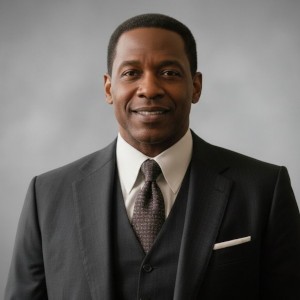
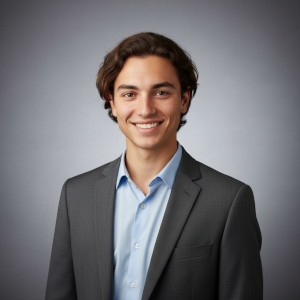
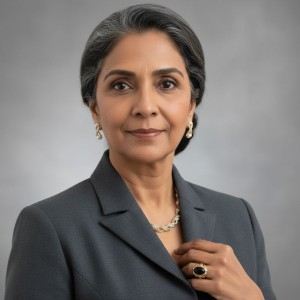

The Challenge: Inconsistent Team Photography
Every growing company faces the same problem: you need professional headshots for your entire team, but your current photo library is a mess. Some employees submitted old vacation photos, others cropped their wedding pictures, and a few sent dimly-lit selfies. The backgrounds range from beach sunsets to cluttered offices, and the lighting quality varies wildly.
Hiring a professional photographer to shoot 20, 50, or 100+ employees is expensive and time-consuming. Coordinating schedules, booking studio time, and managing the logistics can take weeks—and cost thousands of dollars.
What if you could transform your existing mismatched photos into consistent, professional-grade headshots in minutes using AI-powered batch editing?
The Solution: Batch-Ready Describe Edit
ImageFix’s Describe Edit tool in batch mode lets you apply a single natural language prompt across your entire photo library, transforming inconsistent snapshots into polished, on-brand professional headshots—without manual retouching.
AI Image Generation
Describe the image you want to create. Your new image will appear here.
Import instructions
Drag all of your existing teammate photos straight from Google Drive. ImageFix keeps everything grouped for batch work.
Import colleague photos from Google Drive
Drag all of your existing teammate photos straight from Google Drive. ImageFix keeps everything grouped for batch work.
No prompt — just import the Drive folder in one move.
Step 1: Import Your Existing Photo Library
Start by gathering all current employee photos—whether they’re from Google Drive, Dropbox, or scattered across email threads. ImageFix supports direct imports from cloud storage, making it easy to consolidate your entire team’s photos in one place.
What you’ll notice in typical photo libraries:
- Inconsistent backgrounds: Home offices, outdoor settings, conference rooms
- Varying lighting: Harsh overhead lights, natural window light, dim indoor lighting
- Different attire: Casual wear, business casual, formal suits, even t-shirts
- Mixed quality: Professional shots alongside smartphone selfies
- Cropping variations: Full torsos, tight headshots, awkward framings
This inconsistency creates problems for:
- Company websites and “About Us” pages
- LinkedIn company pages and employee profiles
- Investor pitch decks and presentations
- Conference speaker lineups
- Press kits and media resources
- Internal directories and org charts
Step 2: Apply One Prompt Across All Photos
This is where the magic happens. Instead of editing each photo individually, you select your entire photo set and apply a single Describe Edit prompt in batch mode.
Example prompt used above:
“Professional headshot, smart business attire, even grey studio backdrop.”
ImageFix processes each photo individually, intelligently adapting the prompt to each person’s unique features while maintaining consistency across the set.
What the AI does automatically:
- Standardizes backgrounds: Removes distracting elements and applies consistent studio backdrop
- Normalizes lighting: Creates even, professional lighting across all faces
- Adjusts attire: Transforms casual wear into business-appropriate clothing
- Maintains identity: Preserves each person’s unique facial features and expressions
- Optimizes framing: Ensures consistent composition and crop across all headshots
The key advantage: Each image is processed with context awareness, not a one-size-fits-all filter. The AI understands faces, lighting, and professional photography conventions.
Step 3: Review and Export
After batch processing completes (typically 2-5 minutes for 20-50 photos), you’ll have a complete set of consistent, professional headshots ready for immediate use.
Quality assurance checklist:
- ✅ Consistent background color and style
- ✅ Uniform lighting and exposure
- ✅ Similar attire formality
- ✅ Matching composition and framing
- ✅ Natural-looking results that preserve individual identity
Export your headshots in the formats you need:
- High-resolution JPG for print materials and presentations
- PNG with transparency for website overlays and design work
- Optimized web sizes for fast-loading company pages
Real-World Business Impact
Traditional Professional Photography
- Cost: $75-$150 per person for studio headshots
- Time: 2-4 weeks to coordinate scheduling and receive edited photos
- Total for 50 employees: $3,750-$7,500 + staff time
- Scalability: Linear cost increase for each new hire
- Updates: Requires rebooking and repeating entire process
ImageFix Batch Workflow
- Cost: Credits-based pricing, typically $100-$300 for entire team
- Time: 15-30 minutes from upload to final export
- Total for 50 employees: $100-$300
- Scalability: Same process works for 5 or 500 employees
- Updates: Add new employee photos to existing batch anytime
Cost savings: 90-95% reduction compared to traditional photography
Beyond Initial Headshots: Ongoing Applications
Once you’ve established your company’s visual standard, the same batch workflow enables:
1. New Hire Onboarding
Add new employees to your visual brand instantly:
- Request a simple photo during onboarding
- Apply your existing Describe Edit prompt
- Deliver consistent headshot within minutes
- Update website and directory immediately
2. Seasonal Updates
Refresh your team’s look for different contexts:
- Casual Friday version: “Same person, casual polo shirt, friendly smile”
- Conference speaker shots: “Same person, professional attire, stage lighting”
- Holiday cards: “Same person, festive sweater, warm holiday backdrop”
3. Department-Specific Branding
Create variations for different teams:
- Sales team: “Energetic professional, bright background”
- Executive leadership: “Polished executive portrait, dark sophisticated backdrop”
- Creative team: “Artistic professional, soft natural lighting”
4. Multi-Platform Optimization
Generate versions optimized for different uses:
- LinkedIn: Professional with business attire
- Twitter/X: Approachable with relaxed posing
- Company website: Formal with corporate branding
- Internal tools: Casual and friendly
Technical Best Practices
Photo Requirements for Best Results
While ImageFix’s AI is remarkably forgiving, better input photos yield better results:
Minimum requirements:
- Clear view of face (not obscured by sunglasses, hats, or hands)
- Adequate resolution (at least 512x512 pixels)
- Subject facing generally toward camera
Optimal inputs:
- Well-lit face (natural or artificial light)
- Front-facing or slight angle
- Neutral or simple background
- Higher resolution (1024x1024+)
Surprisingly effective inputs:
- Group photos (AI extracts and focuses on individual)
- Casual snapshots from company events
- Zoom meeting screenshots
- Smartphone selfies with good lighting
Crafting Effective Batch Prompts
Your prompt is the key to consistency. Focus on describing the end result, not the transformations needed:
Good prompts:
- “Professional business headshot, grey studio background, business attire, even lighting”
- “Polished corporate portrait, navy backdrop, formal suit, studio-quality lighting”
- “Contemporary professional headshot, white background, smart casual attire, natural smile”
Less effective prompts:
- “Fix the lighting” (too vague)
- “Make it look professional” (undefined target)
- “Remove background and add suit” (focuses on steps, not outcome)
Pro tip: Start with a specific, detailed prompt. Once you find what works for your brand, save it as a template for all future batches.
Processing Time and Batch Size
ImageFix supports up to 50 images per batch for Describe Edit:
- 1-10 images: Typically completes in 1-2 minutes
- 11-25 images: Typically completes in 2-4 minutes
- 26-50 images: Typically completes in 4-8 minutes
For teams larger than 50 people, simply run multiple batches using the same prompt to maintain consistency.
Use Cases Beyond Corporate Headshots
The batch consistency workflow extends far beyond business headshots:
Event Photography Consistency
Standardize photos from conferences, trade shows, or corporate events:
- Normalize varied lighting conditions
- Create consistent backgrounds
- Apply uniform color grading
Product Team Photography
Create consistent imagery for product catalogs:
- Standardize product shots from multiple photographers
- Normalize backgrounds across SKU library
- Apply consistent lighting and styling
Real Estate Agent Teams
Build cohesive brokerage imagery:
- Standardize agent headshots across offices
- Create consistent listing presentation materials
- Maintain brand identity at scale
Content Creator Collaborations
Align visual branding across collaborators:
- Standardize thumbnail photos for podcast guests
- Create consistent author photos for multi-author publications
- Align speaker photos for virtual event lineups
Why This Matters for Modern Businesses
Visual consistency builds trust and professionalism. When every team member’s headshot shares the same quality, lighting, and style, your organization appears:
- Established and professional - Not a startup scrambling for coherence
- Detail-oriented - Shows you care about brand presentation
- Well-organized - Suggests internal processes are equally polished
- Trustworthy - Consistent visuals reduce cognitive friction for potential clients
This matters everywhere your team appears:
- Investor pitch decks (consistency suggests operational excellence)
- Sales proposals (professionalism builds credibility)
- Website team pages (cohesion reinforces brand identity)
- Conference materials (polish attracts better opportunities)
- Press kits (consistency makes journalists’ jobs easier)
Getting Started with Your Team
Ready to transform your team’s headshots? Here’s your action plan:
-
Audit your current photo library
- Gather all existing employee photos
- Identify minimum quality thresholds
- Note which photos might need replacement
-
Define your visual standard
- Choose background color/style
- Decide on attire formality level
- Select lighting mood (bright and energetic vs. soft and approachable)
-
Craft your Describe Edit prompt
- Be specific about desired outcome
- Include background, lighting, and attire
- Test on 3-5 sample photos first
-
Run batch processing
- Upload all photos to ImageFix
- Select entire set for batch processing
- Apply your refined prompt
- Wait 5-10 minutes for processing
-
Review and export
- Check results for consistency
- Make minor adjustments if needed
- Export in required formats
- Deploy across all platforms
-
Establish ongoing process
- Save your prompt template
- Create onboarding checklist for new hires
- Schedule periodic refreshes (annually or bi-annually)
Conclusion
Consistent professional headshots are no longer a luxury reserved for Fortune 500 companies with massive photography budgets. AI-powered batch editing democratizes access to professional-grade team imagery, letting businesses of any size present a polished, cohesive brand.
ImageFix’s Describe Edit tool in batch mode transforms what used to be a weeks-long, expensive photography project into a 30-minute workflow that costs a fraction of traditional methods—while delivering results that are often indistinguishable from studio photography.
Whether you’re a startup building your first team page, a mid-sized company refreshing your brand, or an enterprise standardizing across global offices, batch-powered headshot consistency is now accessible to everyone.
Stop settling for mismatched team photos. Start creating professional, on-brand headshots that make your organization look as polished as it truly is.
Ready to transform your team’s headshots? Get started with ImageFix today.
Transform Your Images with ImageFix
Join thousands of creators, businesses, and professionals who trust ImageFix for their image editing needs.
Join thousands of users already transforming their images with ImageFix